Connecting your own AI agent (MCP)
Where: Your picture, top right → My account → My AI agents
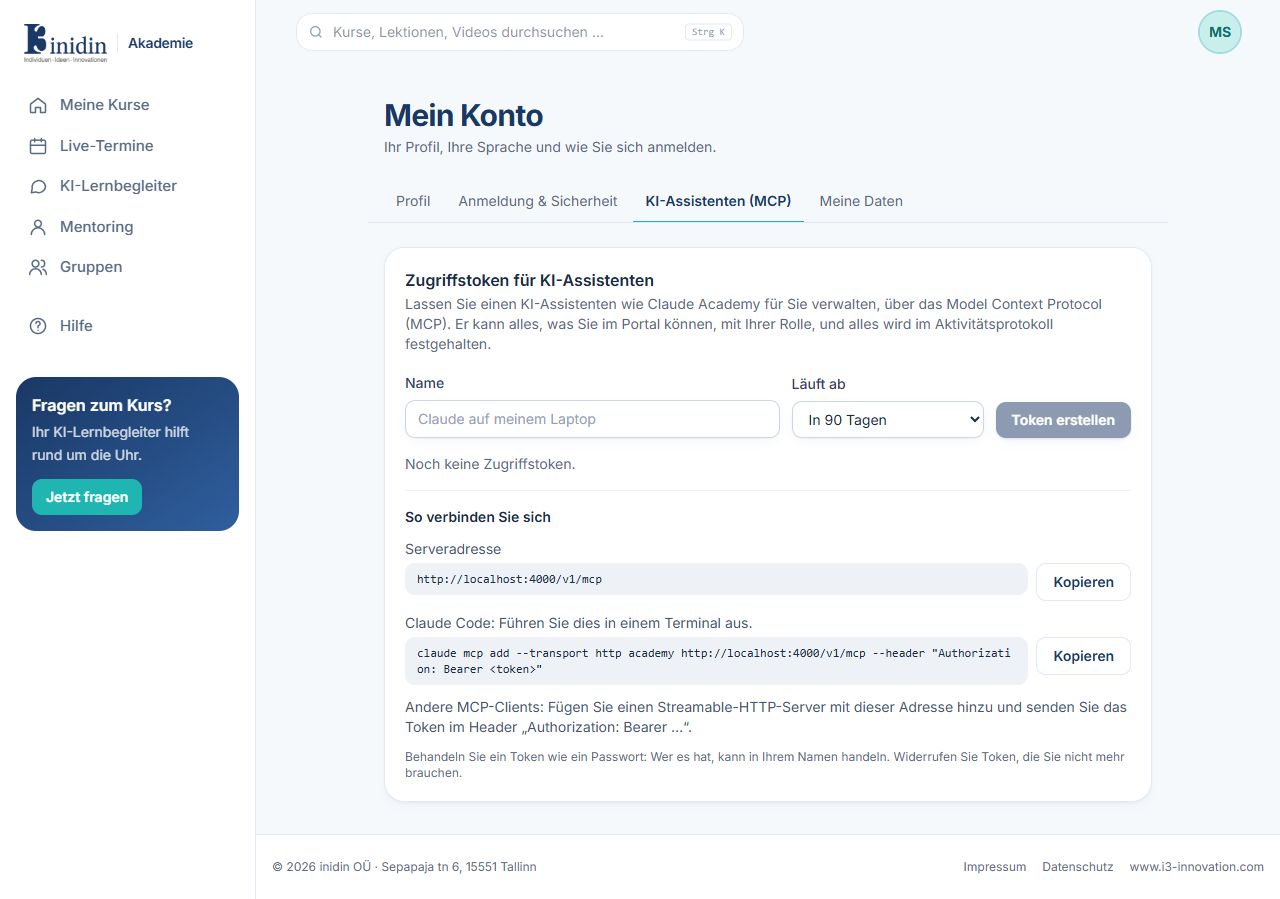
With the Model Context Protocol (MCP), your own AI agent such as Claude or ChatGPT can use the Academy on your behalf: read courses and notes, help you plan, write messages, or as a trainer create courses. The agent runs with you or in your account with its provider, not in the Academy. It can do exactly what your role allows, and everything is in the activity log.
How to
Section titled “How to”- Under “Connect your own AI agent”, copy the Academy’s address.
- Add it to your agent as a connector or MCP server (Claude: Settings → Connectors; ChatGPT: Settings → Connectors in developer mode; Claude Code: the ready-made command).
- Your agent opens the Academy: sign in and click “Allow”. Under “Connected agents” you disconnect it any time.
- If your agent can’t sign in by itself, create an access key below and enter it there.
Fields and buttons
Section titled “Fields and buttons”- Name: So you recognise the token later.
- Expires: In 30 days, 90 days, a year, or never. Shorter is safer.
- Revoke: The token stops working at once.