People
Where: Menu → Manage → People
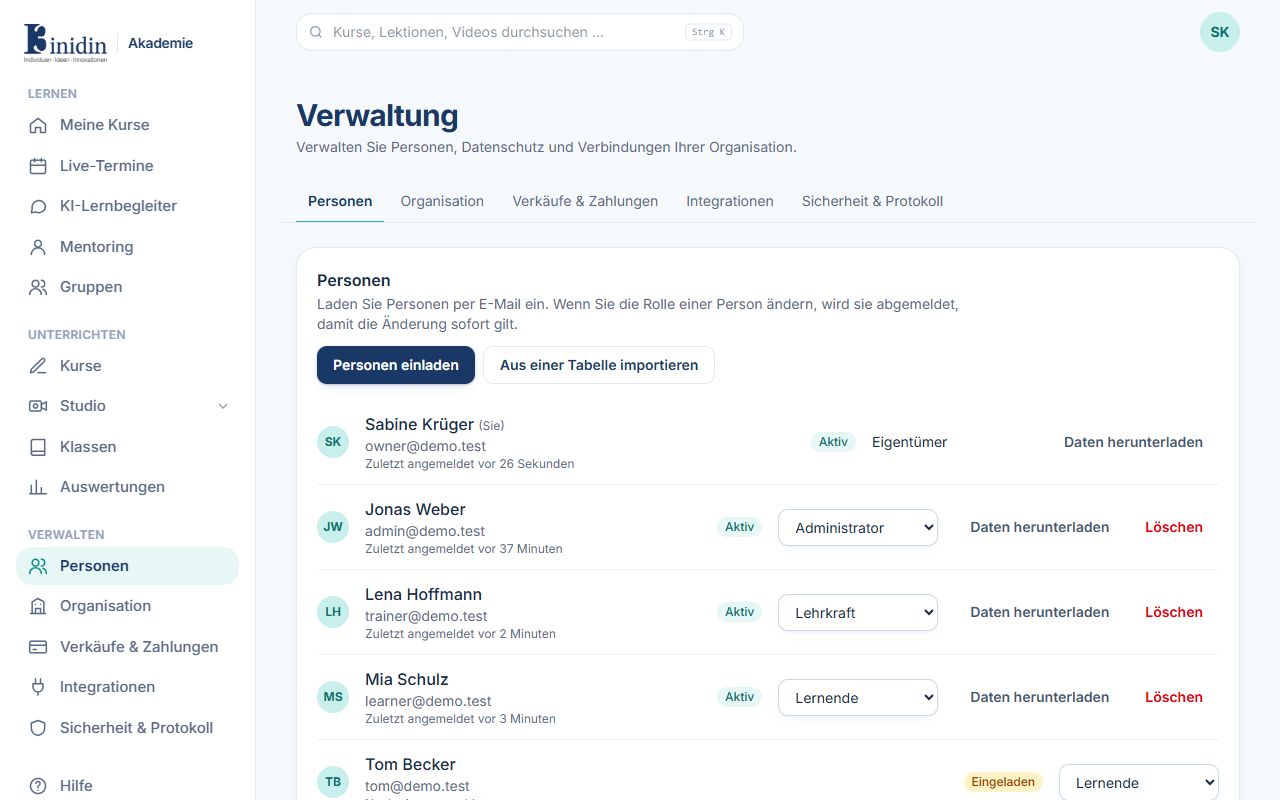
Every member of your organisation with source, role, status and last sign-in. Click the name or “Manage” to open a person. Changing someone’s role signs them out so it applies at once.
Fields and buttons
Section titled “Fields and buttons”- Invite people: Opens the form for a single invitation (see “Inviting someone”).
- Import from a spreadsheet: A CSV file or pasted list with one person per line: name, e-mail and optionally the role. Save Excel sheets as CSV first. Nothing is sent before you’ve checked the list.
- Source: “Local”: created here, you manage name, e-mail and password. “Entra ID”, “Google Workspace”, “OIDC” or “SCIM”: comes from your company’s sign-in or directory; name, e-mail and password are read-only here and changed there. “Customer”: booked through your catalog and manages their own account; you only see them.
- Name and email: First name, last name and e-mail address of local people. If the sign-in is also used outside your organisation, only the person changes e-mail and password.
- Send a reset link: The person gets an e-mail to choose a new password.
- Set a start password: You set a password and pass it on securely. When the person first signs in with it, they choose their own right away; all their devices are signed out.
- Roles: Administrator, trainer, mentor, mentee or learner, also combined. Also for people from the company sign-in.
- Resend invitation: For people who have never signed in.
- Download data: All data about a person, e.g. for a GDPR access request.
- Delete: Deletes the account: learning data is removed, name and e-mail replaced with a placeholder.